
Monday — a tough day? Not for us.
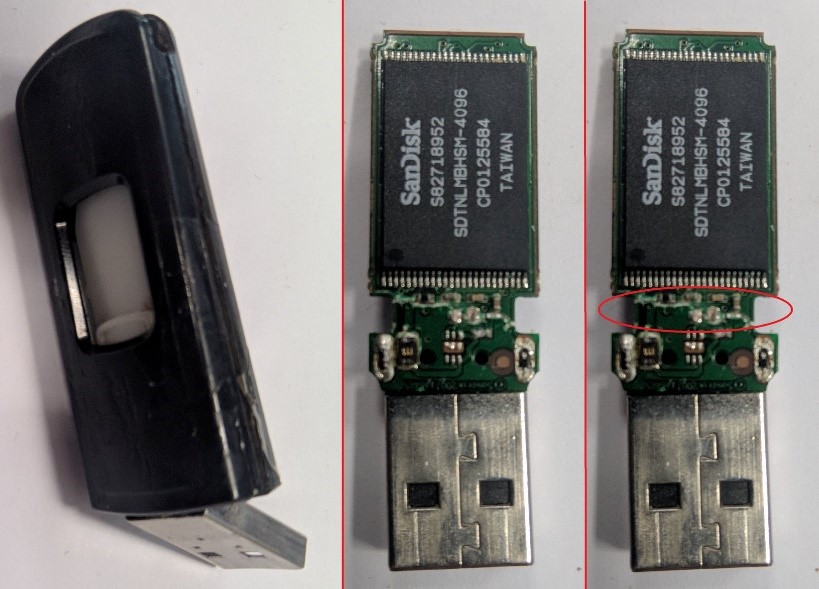
A USB stick whose circuit board turned out to be weaker than the connector itself. , after re-soldering the chip containing the data, we managed to read it using our equipment.
Data recovery from USB (Universal Serial Bus) drives may be necessary in various situations, such as when files have been deleted, the drive has been formatted, or due to other unexpected data loss. Here are some steps and guidelines on how to attempt to recover data from a USB:
Check the USB condition: Make sure that the USB drive is not physically damaged, for example, it is not broken, cracked, or has faulty connectors. Physical damage can prevent data from being read.
Try using a different USB port or computer: Connect the USB drive to another USB port or a different computer. Sometimes the issue may be related to a specific port or computer.
Use system tools: Operating systems often have tools that allow you to recover deleted files or restore the system to a previous point. For example, the Windows “Previous Versions” feature can be helpful.
Scan the USB drive on another device: If possible, try scanning the USB drive using another device that supports USB connection, such as a different computer or USB port.
Professional data recovery services: If regular software does not help, or if the data is extremely important, you can turn to professional data recovery services. These are companies or specialists who have specialized equipment and expertise to recover data from damaged drives.
It is important to effectively avoid any additional writing to the USB drive after data loss, as this can harm the chances of recovery. It is also advisable to regularly create backups to reduce the risk of data loss in the future.